
The SIRAS Upload feature in the California version of OnDataSuite File Center allows districts to upload Special Education data provided through SIRAS for analysis and reporting within OnDataSuite.
Access to the SIRAS upload option is restricted and will only be available after the district has acknowledged the Memorandum of Understanding (MOU) between the district and its SELPA.
This requirement ensures that districts have confirmed appropriate data-sharing permissions before uploading Special Education data.
Prerequisite – MOU Acknowledgement Required
Before the SIRAS upload option becomes available, an OnDataSuite Administrator must review and accept the SELPA data-sharing agreement within the system.
Steps to Enable the SIRAS Upload
- Log in to OnDataSuite with an Administrator account.
- Navigate to the Admin section.
- Select Partners.
- Locate the SELPA partner agreement listed for your district.
- Review the Memorandum of Understanding (MOU).
- Confirm agreement by checking the acceptance box.
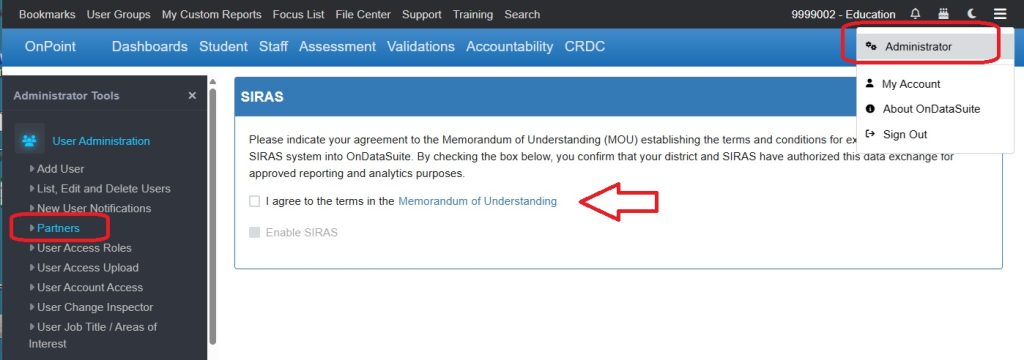
Once the MOU has been accepted, the SIRAS file upload option will become available in the File Center.
Important
Districts should also share a copy of the signed or accepted MOU with their SELPA to ensure both parties have a record of the agreement and to confirm approval for data sharing.
Failure to share the agreement with the SELPA may delay the approval or use of SIRAS data within collaborative reporting processes.
After the MOU is Accepted
Once the MOU acknowledgement is completed:
- Navigate to File Center.
- Locate the SIRAS Upload option.
- Upload the SIRAS export file according to the standard file upload process.
The uploaded data will then be processed and made available for reporting within OnDataSuite.
Additional Notes
- Only OnDataSuite Administrators can accept the MOU.
- The upload option will remain unavailable until the MOU has been acknowledged.
- Districts should verify that they are using the correct SIRAS export format when uploading files.