
📍 Where to Find This Page
Student Profile → Assessments → Amplify DIBELS
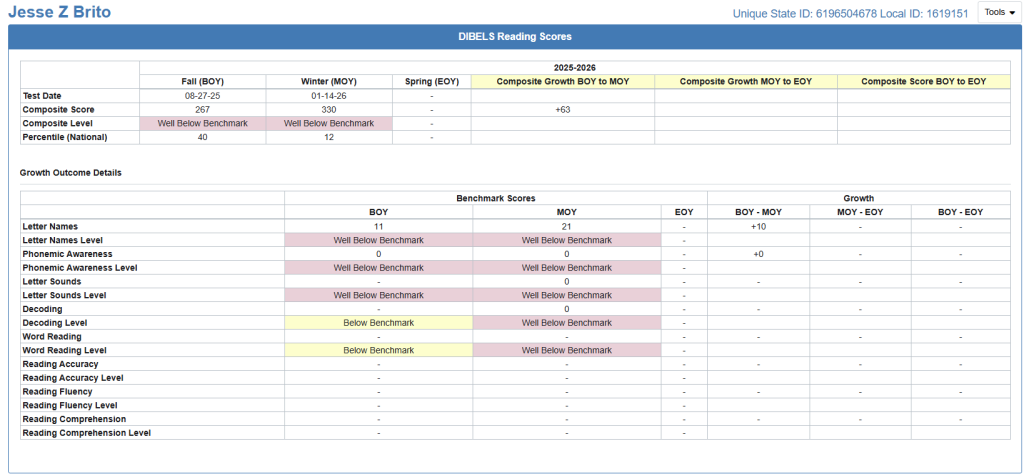
The Amplify DIBELS Assessment Results page provides a detailed view of an individual student’s reading assessment performance across the Beginning of Year (BOY), Middle of Year (MOY), and End of Year (EOY) testing windows. The page summarizes overall reading performance, benchmark status, national percentile rankings, and growth between assessment periods to help educators monitor literacy development throughout the school year.
👤 What this Page Shows
The Amplify DIBELS Assessment Results page displays:
- Assessment dates for each testing window
- Composite DIBELS Reading scores
- Benchmark performance levels
- National percentile rankings
- Growth between testing windows
- Individual reading skill measures
- Performance levels for each assessed skill
The information presented provides a longitudinal view of a student’s reading development and progress toward grade-level literacy benchmarks.
💡 Suggested Uses
The Amplify DIBELS Assessment Results page helps educators:
- Monitor reading growth throughout the school year.
- Identify students needing targeted reading intervention.
- Review benchmark performance across multiple testing windows.
- Compare progress between Beginning, Middle, and End of Year assessments.
- Evaluate strengths and areas for instructional support.
- Prepare for intervention meetings and parent conferences.
- Document student reading growth over time.
🧭 Data Sources
The Amplify DIBELS Assessment Results page displays information imported into OnDataSuite from Amplify DIBELS assessment files.
The information displayed depends on:
- The assessment windows completed by the student.
- The student’s grade level.
- The assessment measures administered during each testing window.
📑 Visuals and Data Views
The page is organized into two primary sections.
DIBELS Reading Summary
The upper section summarizes overall reading performance for each assessment window:
- Beginning of Year (BOY)
- Middle of Year (MOY)
- End of Year (EOY)
For each testing window, the page may display:
- Assessment Date
- Composite Score
- Composite Performance Level
- National Percentile Ranking
Growth calculations are also provided when multiple assessment windows are available, including:
- BOY to MOY Growth
- MOY to EOY Growth
- BOY to EOY Growth
Positive values indicate improvement between testing periods, while negative values indicate a decline in performance.
Reading Skill Results
The lower section provides detailed results for individual DIBELS reading measures.
Depending on grade level and available assessment data, measures may include:
- Letter Naming Fluency
- Phonemic Awareness
- Letter Sounds
- Decoding
- Word Reading
- Reading Accuracy
- Reading Fluency
- Reading Comprehension
Each assessment measure may display:
- BOY Score
- MOY Score
- EOY Score
- BOY to MOY Growth
- MOY to EOY Growth
- BOY to EOY Growth
- Performance Level
The measures displayed vary based on the student’s grade level and the assessments administered.
📊 How to Interpret this Page
Amplify DIBELS performance levels indicate how a student’s reading skills compare to grade-level benchmark expectations.
Performance levels include:
- Above Benchmark – The student is performing above grade-level expectations and demonstrates strong reading skills.
- At Benchmark – The student is meeting grade-level expectations and is on track for reading success.
- Below Benchmark – The student may benefit from additional instructional support or targeted intervention.
- Well Below Benchmark – The student is significantly below benchmark expectations and may require intensive intervention.
Growth calculations help educators evaluate changes in student performance between testing windows.
Because assessment measures vary by grade level, not every student will have results for every reading skill. Blank fields indicate that no assessment data was available for that measure during the selected testing window.
🔗 Related Articles & Helpful Reports
- Student Profile – Overview
- Amplify Math List Report
- Amplify Lectura Assessment Results
- DIBELS 8th Edition List Report
These related articles provide additional information about student assessment results and complementary literacy reports available within OnDataSuite.