
📍 Where to Find This Page
Student Profile → Student Information → Overview
The Student Profile Overview page serves as the central landing page for an individual student within OnDataSuite. It brings together demographic information, assessment results, attendance, discipline, program participation, and family information into a single, easy-to-read dashboard, allowing educators to quickly understand a student’s overall profile without navigating between multiple pages.
👤 What this Page Shows
The Student Profile Overview displays a comprehensive snapshot of an individual student’s educational record, including:
- Student identification and enrollment information
- Demographic information
- Program participation indicators
- Parent/Guardian information
- English Language Arts assessment summaries
- Mathematics assessment summaries
- ELPAC results
- Social-Emotional Learning (SEL) survey results
- Attendance history
- Discipline history
Information throughout the page updates automatically as new data is imported into OnDataSuite.
💡 Suggested Uses
The Student Profile Overview helps educators and administrators:
- Quickly review a student’s complete academic and demographic profile.
- Prepare for parent or guardian conferences.
- Monitor academic performance across multiple assessment platforms.
- Identify attendance or behavior trends that may require intervention.
- Review participation in state and district programs.
- Support Multi-Tiered System of Supports (MTSS), intervention planning, and student success meetings.
- Access key student information from a single location rather than multiple reports.
🧭 Data Sources
The Student Profile Overview combines information imported into OnDataSuite from the district’s Student Information System (SIS), CALPADS, assessment vendors, and other supported data sources.
Information displayed on the page may include data from:
- Student Information System (SIS)
- CALPADS
- CAASPP
- ELPAC
- NWEA MAP
- i-Ready
- DIBELS
- Amplify
- Social-Emotional Learning (SEL) assessments
- Attendance and discipline records
- Other district-supported assessment vendors
The information displayed depends on the data available for the selected student.
📑 Visuals and Data Views
The Student Profile Overview is organized into several information panels.
Student Summary Header
The top of the page provides an at-a-glance summary of the selected student, which may include:
- Student photo
- Student name
- Grade level
- Current school
- Reading assessment count
- Mathematics assessment count
- Active indicator count
- Current attendance percentage
This summary provides a quick snapshot of the student’s current academic and engagement profile.

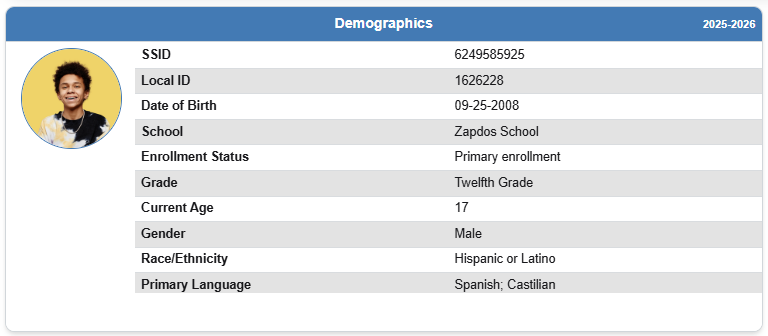
Demographics
The Demographics panel displays current enrollment and identifying information, including:
- State Student Identifier (SSID)
- Local Student ID
- Date of Birth
- Age
- School
- Enrollment Status
- Grade Level
- Gender
- Race/Ethnicity
- Primary Language
Indicators
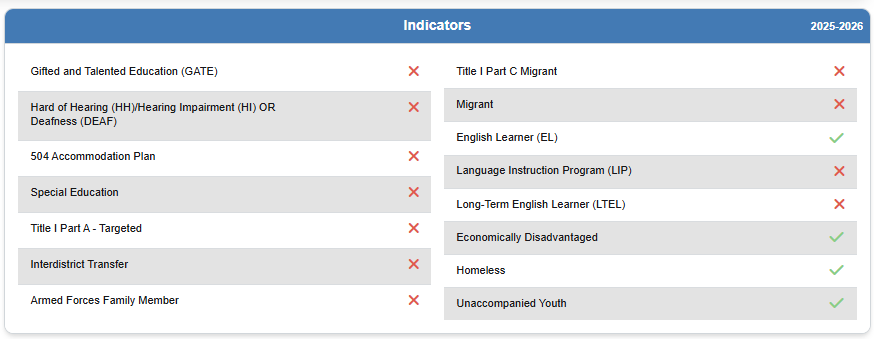
The Indicators panel displays active student program participation and status indicators, such as:
- Gifted and Talented Education (GATE)
- English Learner (EL)
- Long-Term English Learner (LTEL)
- Language Instruction Program (LIP)
- Migrant Education
- Homeless
- Unaccompanied Youth
- Students with Disabilities
- Section 504 Plan
- Economically Disadvantaged
- Armed Forces Family Member
- Interdistrict Transfer
- Title I Participation
Indicators reflect each student’s current eligibility and participation status.
Parent/Guardian Information
Displays available family information, including:
- Parent/Guardian names
- Highest reported parent education level
This information can provide additional context when communicating with families or planning student supports.

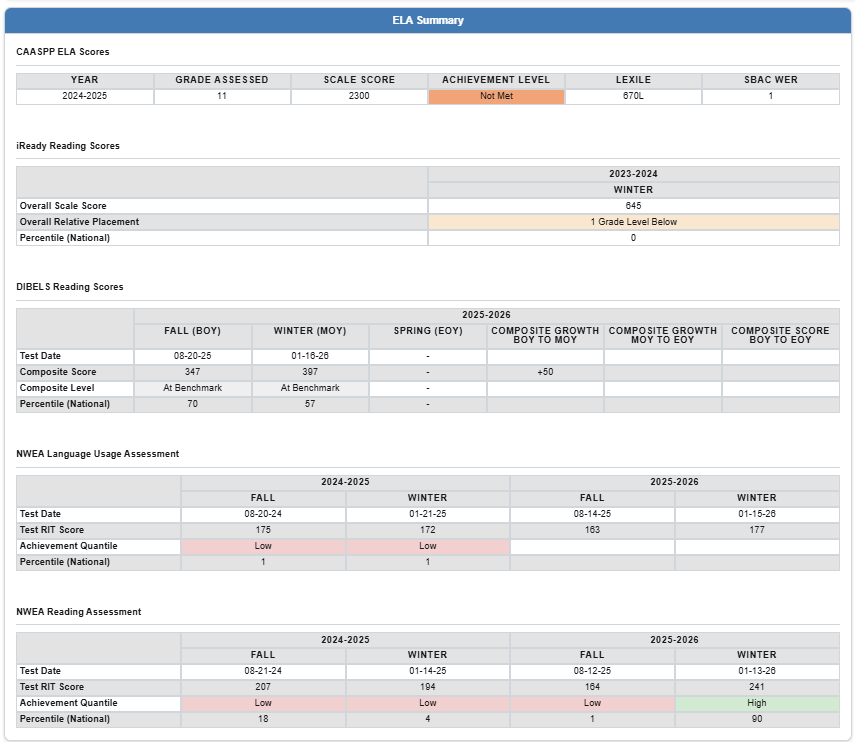
ELA Summary
Provides a consolidated view of English Language Arts assessment results from supported assessment systems, which may include:
- CAASPP
- NWEA MAP
- i-Ready
- DIBELS
- Amplify
- Other district-supported assessments
The assessments displayed depend on the data available for the student.
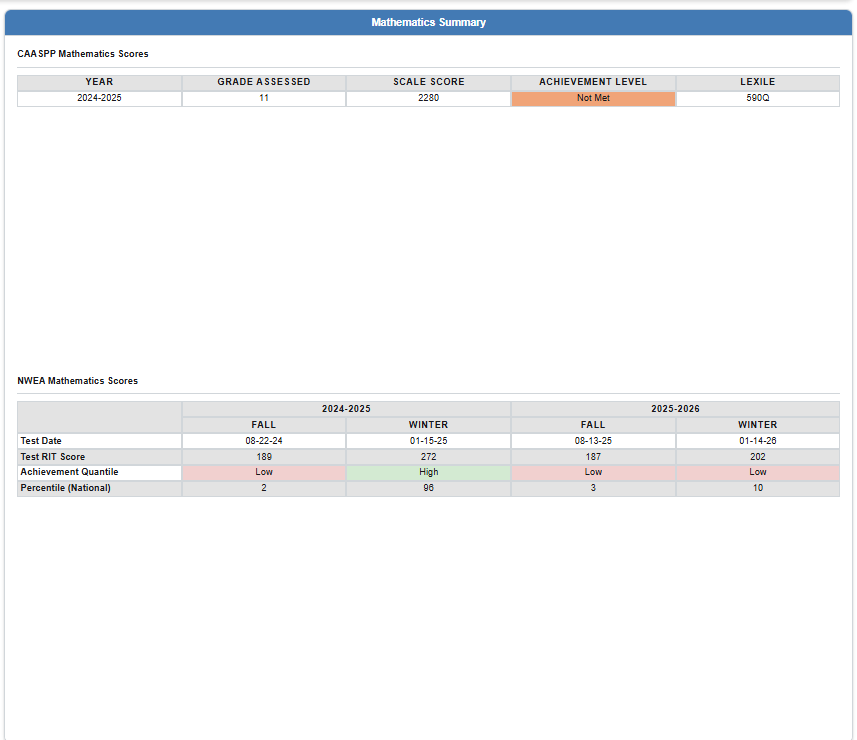
Mathematics Summary
Provides a consolidated view of mathematics assessment performance from supported assessment systems, including:
- CAASPP
- NWEA MAP
- i-Ready
- Other district-supported mathematics assessments
ELPAC Scores
For English Learners, the ELPAC Scores section may display:
- Overall Performance Level
- Listening
- Speaking
- Reading
- Writing
- Assessment Year
This section provides a quick view of English language proficiency growth over time.

SEL Survey
Displays Social-Emotional Learning (SEL) survey results when available.
Information may include:
- Survey type
- Academic year
- Survey window
- Survey name
- Overall score
- Survey measures and indicators
Displayed information depends on the SEL assessments administered by the district.

Attendance
Displays longitudinal attendance information, including:
- Attendance rate
- Absence totals
- Chronic absenteeism indicators
- Attendance trends over time

Discipline
Displays longitudinal discipline information, including:
- Behavior incidents
- Referrals
- Suspensions
- Discipline trends over time

📊 How to Interpret this Page
The Student Profile Overview is designed to provide a holistic view of a student’s educational experience.
Educators can use the combination of demographic information, assessment performance, attendance history, discipline records, and program participation to:
- Identify students needing additional academic or behavioral support.
- Monitor progress toward educational goals.
- Recognize attendance or discipline patterns that may affect achievement.
- Review assessment performance across multiple testing platforms.
- Better prepare for parent conferences, Student Success Team (SST) meetings, MTSS discussions, IEP meetings, and intervention planning.
The Student Profile Overview is intended as a summary page. While it consolidates information from multiple data sources, the individual sections are not clickable. Users can navigate to the corresponding Student Profile pages and reports for more detailed analysis.
🔗 Related Articles & Helpful Reports
Additional Student Profile articles include:
- Student Profile – Renaissance STAR Reading
- Student Profile – Renaissance STAR Math
- Student Profile – Renaissance STAR Spanish
- Student Profile – Amplify DIBELS
- Student Profile – Amplify Lectura
- Student Profile – Acadience Reading
- Student Profile – Acadience Math
- Student Profile – Acadience PELI
- Student Profile – Lexia Core5
- Student Profile – Lexia PowerUp
- Student Profile – Panorama SEL Survey
- Student Profile – VAST SEL Survey
Additional student information can also be found throughout the Student Profile section and in related assessment reports available within OnDataSuite.