
📍 Where to Find This Report
Student → Student Custom Reports → CTE → CTE Pathways Report
The CTE Pathways Report identifies students who have completed one or more Career Technical Education (CTE) Pathways based on CALPADS course completion data. It allows districts to verify pathway completion, monitor participation in CTE programs, and support College and Career Indicator (CCI) reporting and local program evaluation.
👤 What this Report Shows
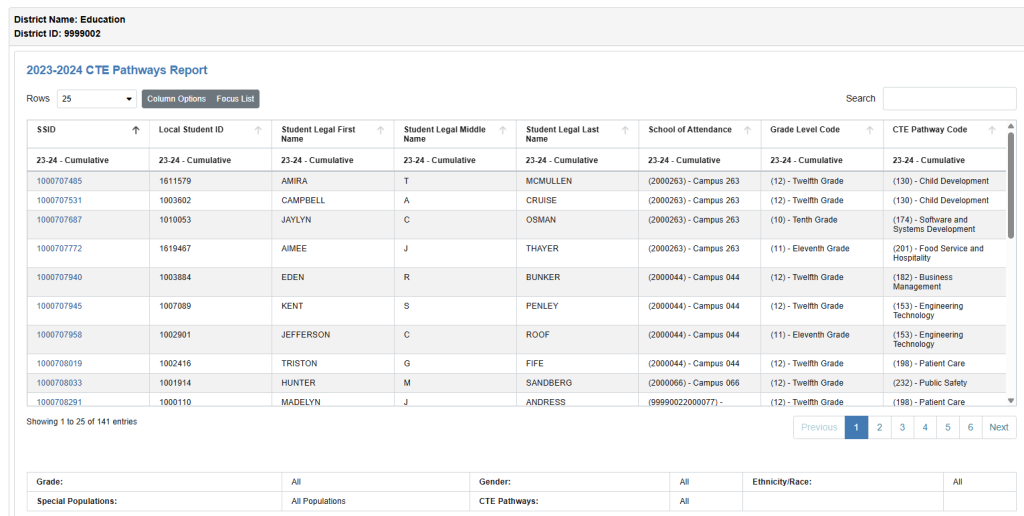
The CTE Pathways Report displays one row for each completed CTE pathway.
Each record identifies:
- The student who completed the pathway
- The completed CTE pathway
- The student’s school and grade level
- Additional demographic information, when selected
Because students may complete more than one CTE pathway, the same student may appear multiple times in the report.
💡 Suggested Uses
The CTE Pathways Report helps districts:
- Verify students who have completed CTE pathways.
- Review pathway completion by school or district.
- Identify students within specific Career Technical Education pathways.
- Monitor CTE program participation.
- Support College and Career Indicator (CCI) reporting.
- Validate CALPADS course completion data.
- Export pathway completion data for local analysis.
- Analyze pathway completion across student groups.
🧭 Data Sources
The report uses CALPADS course completion information imported into OnDataSuite.
Pathway completion is determined by evaluating completed courses against California Career Technical Education pathway definitions.
The report reflects the most current imported course completion data available for the selected Academic Year.
🎛 Filter Options
The report includes standard student filters along with CTE-specific filtering options.
General Filters
- Academic Year
- School Type
- School
- Grade
- Gender
- Ethnicity/Race
- Special Populations
- Focus List
CTE Filters
- CTE Pathway
Use these filters individually or in combination to review pathway completion for specific schools, student groups, or instructional programs.
After selecting the desired filters, click Submit to generate the report.
📑 Visuals and Data Views
The report displays a searchable table containing one row for each completed student pathway.
Common columns include:
Student Information
- State Student Identifier (SSID)
- Local Student ID
- Student Name
- School of Attendance
- Grade Level
Pathway Information
- CTE Pathway Code
- CTE Pathway Name
Additional demographic and enrollment fields may also be displayed depending on the selected Column Options.
Column Options
The Column Options feature allows users to:
- Show or hide report columns.
- Customize the report layout.
- Display only the information needed for a particular analysis.
Table Features
The report includes built-in tools that allow users to:
- Search for individual students.
- Sort by any column.
- Customize displayed columns.
- Export results using the Tools menu.
- Filter results using a Focus List.
📊 How to Interpret This Report
The CTE Pathways Report identifies students who have completed one or more Career Technical Education pathways based on imported CALPADS course completion records.
Each row represents a completed pathway for a student—not necessarily a unique student. Students who complete multiple pathways will appear once for each completed pathway.
If expected students do not appear in the report:
- Verify that the latest CALPADS course completion files have been imported.
- Confirm the selected Academic Year.
- Review the CTE Pathway filter.
- Remove restrictive filters and rerun the report.
Combining pathway filters with demographic filters provides valuable insight into participation and completion among specific student populations.
🔗 Related Articles & Helpful Reports
- CALPADS CCI Indicator Report
- A-G Courses Report
- Course Sections Completed – Student List for Departmentalized Courses (3.11)
- Course Sections Completed – Count and Details for Departmentalized Courses (3.10)
These related reports provide additional information about course completion, college and career readiness, and Career Technical Education programs within OnDataSuite.